View Issue Details
| ID | Project | Category | View Status | Date Submitted | Last Update |
|---|---|---|---|---|---|
| 0001181 | T99X171.00 SKB Eagle | SW | public | 2021-03-30 17:14 | 2021-06-23 14:21 |
| Reporter | (ALTech) Younkwang Jung | Assigned To | (ALTech) Younkwang Jung | Due Date | |
| Priority | high | Severity | s2-severe | Reproducibility | have not tried |
| Status | closed | Resolution | fixed | ||
| Summary | 0001181: [Smart3][AI2MAX/SWAN] Add the contents of the BT Pairing Guide to the initial setup. | ||||
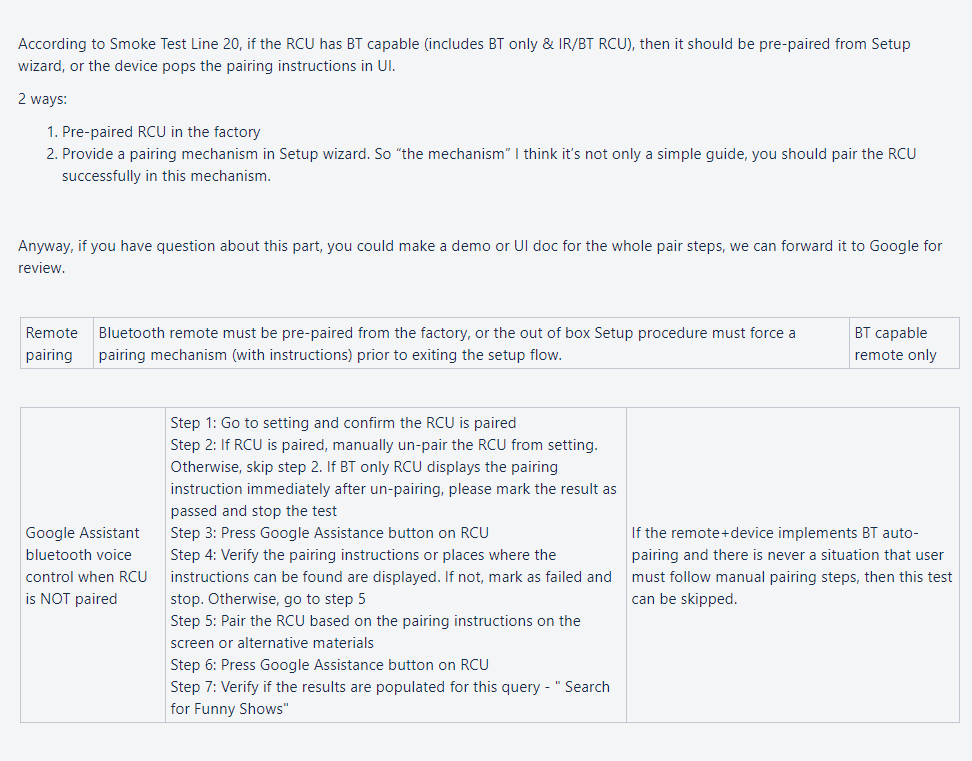
| Description | Hi Kerwin SKB has been asked to add the contents of the Pairing Guide to the initial setup. This content is also related to Google certification, so please apply it carefully. You can use the attached file. ( bt_pairing_setup.png ) The bt pairing setup menu should come out first. "bt_pairing_setup.png" -> OK button -> "이더넷으로 연결됨"(network menu) -> OK button -> google "TV 100% 활용하기" -> OK button.. For additional information, INTEK received this content from Harman. (google_rcu_guide.png) Based on this information, SKB created a BT pairing guide image and there is a request to apply it to AI2MAX(SWAN) and Smart3. if you have any question , please contact me Thank you YK.Jung | ||||
| Tags | No tags attached. | ||||
| Attach Tags | |||||
| User List |
(ALTech) SY Yoon , (ALTech) Wooshin Kang |
|---|
|
|
|
|
|
Do you have show hint to tell user if the pairing success or failure? According to the image file ( bt_pairing_setup.png ) just remind user how to pairing. Usually the BT have callback event to receive when RCU pairing success and 'AUTO' jump to next page, so I confused the button effect. |
|
|
Hi Mr. Jung, The picture you provided looks like it suggest that users pair RCU at the first step, users can still use IR mode to skip this page. But from the requirement, it ask the user to pair the RCU successfully before entering to the next step. |
|
|
Hi Jason , Logan As far as I know, only the guide image was displayed at INTEK's STB After the image was displayed, when user simply pressed the "OK" button, moved on to the next page. Let's check further whether this behavior is different depending on whether the RCU is already paired or not. Thanks YK.Jung |
|
|
Hi Mr. Jung, Does INTEK's 3PL can accept it (Just only display paring guide) ? If we only apply this paring guide, we need to confirm the behavior of this page. Is the "button" in the pairing guide a fake button? if the button is fake, we can not add keyevent listener on this button, we will add keyevent listener on this whole page, And this page "ONLY" accept OK button, Am I correct? |
|
|
Hi Jason Yes , this page ONLY accept OK button. QA tester checked the operation on pairing Guide in the INTEK's box. - Press the OK button on the RCU to go to the next page. - Automatically move to the next page when BT pairing is completed on the Pairing Guide. And when it's paired on the Pairing Guide, toast pop-up was displayed. Please implement it like this. additionally , the Pairing Guide image file will be updated soon. INTEK has already applied this. however, the 3PL was not tested because it was less than 3 months old. Thanks YK.Jung |
|
|
Hi Jason Please use this attached new image(15_booting_BT_pairing_guide.png). if you make new FW include BT_pairing_guide for smart3, please send it to me. then we will check it Thanks YK.Jung |
|
|
Hi Mr. Jung, please provide RCU model name, we need to check RCU list if the paired success |
|
|
Hi Logan As far as I know, the toast pop-up is basically displayed at the bottom of the screen. so you don't need a RCU list. Thanks |
|
|
HI Logan Could you send me the test FW that contains theBT Pairing Guide quickly? SKB wants me to check it quickly. Thanks |
|
|
Hi Mr. Jung Please test it. https://drive.google.com/file/d/1iJLI5skV7ejZopBnodD066ZWspGKXYBQ/view?usp=sharing file name is aml_upgrade_k000b-523r06s_SD_BFX-AT100.img (s means SetupWizard) If there is no issue, please let us know, we'll push this modification to bitbucket. |
|
|
Hi Jason QA Team checked it , it's ok , please push it to bitbucket. SKB will check the official FW again. and please apply this modification to swan. Additionally , when you push it to bitbucket, please let us know the commit id. Thank you for your support YK.Jung |
|
|
Hi Mr. Jung, Already push to bitbucket 2021-04-08 08:48:22 | jason.tf.ling@fii-.. | f69a6fe | vendor/amlogic/common | Add RCU paring guide in setup wizard |
|
|
Hi Jason I checked that this modification was applied to smart3, but was it applied to swan? It should also be applied to swan. please let me know the swan commit id. Thank you YK.Jung |
|
|
Hi Mr. Jung I just finished it. 2021-04-08 11:38:10 | jason.tf.ling@fii-.. | abad271 | vendor/foxconn | Add RCU paring guide in setup wizard |
|
|
Hi Jason I will close this issue after checking the official version with SKB. Thank you YK.Jung |
| Date Modified | Username | Field | Change |
|---|---|---|---|
| 2021-03-30 17:14 | (ALTech) Younkwang Jung | New Issue | |
| 2021-03-30 17:14 | (ALTech) Younkwang Jung | Status | new => assigned |
| 2021-03-30 17:14 | (ALTech) Younkwang Jung | Assigned To | => (SW) Kerwin Chen |
| 2021-03-30 17:14 | (ALTech) Younkwang Jung | File Added: BT_pairing_setup.png | |
| 2021-03-30 17:14 | (ALTech) Younkwang Jung | File Added: google_rcu_guide.png | |
| 2021-03-30 17:15 | (ALTech) Younkwang Jung | Issue Monitored: (ALTech) SY Yoon | |
| 2021-03-30 17:15 | (ALTech) Younkwang Jung | Issue Monitored: (ALTech) Wooshin Kang | |
| 2021-04-01 09:57 | (SW) Kerwin Chen | Assigned To | (SW) Kerwin Chen => (SW) Jason Ling |
| 2021-04-01 10:06 |
|
Assigned To | (SW) Jason Ling => (SW) Logan Hou |
| 2021-04-01 11:14 |
|
Note Added: 0006548 | |
| 2021-04-01 11:16 |
|
Note Edited: 0006548 | |
| 2021-04-01 11:18 |
|
Note Edited: 0006548 | |
| 2021-04-01 11:28 |
|
Note Added: 0006549 | |
| 2021-04-02 15:47 | (ALTech) Younkwang Jung | Note Added: 0006560 | |
| 2021-04-02 15:48 | (ALTech) Younkwang Jung | Note Edited: 0006560 | View Revisions |
| 2021-04-06 09:26 |
|
Note Added: 0006569 | |
| 2021-04-06 18:24 | (ALTech) Younkwang Jung | Note Added: 0006587 | |
| 2021-04-06 19:06 | (ALTech) Younkwang Jung | File Added: 15_booting_BT_pairing_guide.png | |
| 2021-04-06 19:06 | (ALTech) Younkwang Jung | Note Added: 0006589 | |
| 2021-04-07 08:57 |
|
Note Added: 0006594 | |
| 2021-04-07 09:50 |
|
Note Edited: 0006594 | |
| 2021-04-07 09:52 |
|
Note Edited: 0006594 | |
| 2021-04-07 10:21 | (ALTech) Younkwang Jung | Note Added: 0006599 | |
| 2021-04-07 14:52 | (ALTech) Younkwang Jung | Note Edited: 0006599 | View Revisions |
| 2021-04-07 14:54 | (ALTech) Younkwang Jung | Note Added: 0006612 | |
| 2021-04-07 18:08 |
|
Note Added: 0006618 | |
| 2021-04-07 18:09 |
|
Assigned To | (SW) Logan Hou => (ALTech) Younkwang Jung |
| 2021-04-08 08:34 | (ALTech) Younkwang Jung | Note Added: 0006623 | |
| 2021-04-08 08:53 |
|
Note Added: 0006624 | |
| 2021-04-08 11:27 | (ALTech) Younkwang Jung | Note Added: 0006629 | |
| 2021-04-08 11:46 |
|
Note Added: 0006631 | |
| 2021-04-08 12:43 | (ALTech) Younkwang Jung | Note Added: 0006632 | |
| 2021-06-23 14:21 | (ALTech) Younkwang Jung | Status | assigned => closed |
| 2021-06-23 14:21 | (ALTech) Younkwang Jung | Resolution | open => fixed |